Deep Dive into InnoDB Row Formats
When using MySQL, we typically insert data record by record. But how are these records actually stored on disk? This brings us to InnoDB’s row formats.
InnoDB supports four row formats.
COMPACT
Records in the COMPACT format are stored as follows:

It is broadly divided into two main parts: Record Information and Record Data. Let’s take a look at their composition:
Record Information
Variable-Length Field List
MySQL supports many variable-length fields, such as VARCHAR and TEXT. In addition to these, some character sets themselves have variable lengths (for example, GBK requires 1 to 2 bytes per character). Since data stored in variable-length fields and certain character sets can vary in size, a mechanism is needed to track the byte length of each field. In the COMPACT format, the variable-length field list stores the number of bytes used by each variable-length field, and these lengths are stored in reverse order of their corresponding columns.
For example, if a table has three VARCHAR columns C1, C2, and C3 storing 1, 2, and 3 bytes respectively, the variable-length field list will contain |03|02|01|.
Of course, the size of this variable-length field list isn’t fixed at two bytes; it’s dynamic. Specifically, for a VARCHAR(M) column, assuming each character takes W bytes and the actual string uses L bytes, if M × W is greater than 255 and L is greater than 127, two bytes are used. Otherwise, one byte is sufficient.
Why is it designed this way? Because the maximum value a single byte can represent is 255. If it doesn’t exceed this, one byte is enough. The 127 limit is particularly interesting: starting from 128, the highest bit of a byte becomes 1. This allows MySQL to quickly determine whether one or two bytes are used for the length by simply checking the highest bit of the first byte. (While this might waste a small amount of space, the evaluation and calculation logic is highly CPU-friendly. Checking if the highest bit is 1 immediately tells the CPU how to compute the value: for one byte it’s just
b0, and for two bytes it’s(b0 & 0b0111111) * 256 + b1.)You might also ask, what if even two bytes can’t represent the length? This is where the overflow page mechanism comes into play, which will be explained in detail later.
Another important point: if a variable-length field is NULL, it is completely skipped in the variable-length field list rather than being recorded with a length of 0.
NULL Value List
A record’s column data may contain NULL values. In COMPACT, these are tracked collectively using the following process:
- Count how many columns in the table allow
NULL. If none do, no NULL value list is needed. - Otherwise, each nullable column corresponds to a single bit flag (1 for
NULL, 0 for notNULL). These flags are stored in reverse order of the columns in the NULL value list. - Additionally, these bits must occupy whole bytes (1 byte = 8 bits). If there are fewer than 8 bits, the remaining high-order bits are padded with 0s.
Record Header Information
The record header occupies a fixed 5 bytes and stores various attributes of the record, as detailed below:
| Name | Size (bits) | Description |
|---|---|---|
| Reserved 1 | 1 | Unused |
| Reserved 2 | 1 | Unused |
deleted_flag | 1 | Indicates whether the record is deleted |
min_rec_flag | 1 | Marks the minimum directory record for non-leaf nodes at each level of the B+ tree |
n_owned | 4 | Used by the group leader to indicate the number of records in the group |
heap_no | 13 | Indicates the relative position of the current record within the page’s heap |
record_type | 3 | Indicates the record type: 0 for normal records, 1 for non-leaf node directory records in the B+ tree, 2 for Infimum, 3 for Supremum |
next_record | 16 | Indicates the relative position of the next record |
Additionally, the first 4 bits of the record header are collectively referred to as the info bits.
Record Data
In addition to user-defined columns, the record data also stores several hidden columns:
| Column Name | Required? | Size (bytes) | Purpose |
|---|---|---|---|
DB_ROW_ID | No | 6 | Row ID |
DB_TRX_ID | Yes | 6 | Transaction ID |
DB_ROLL_PTR | Yes | 7 | Rollback Pointer |
DB_ROW_ID is used to uniquely identify a row. It is omitted if the user defines a primary key or has a non-nullable UNIQUE column.
Furthermore, for CHAR(M) columns using a variable-length character set, COMPACT requires them to be included in the variable-length field list. They must occupy at least M bytes, even if empty (which can be seen as a pre-allocation optimization).
REDUNDANT
REDUNDANT is a legacy format used prior to MySQL 5.0. Records in this format are stored as follows:
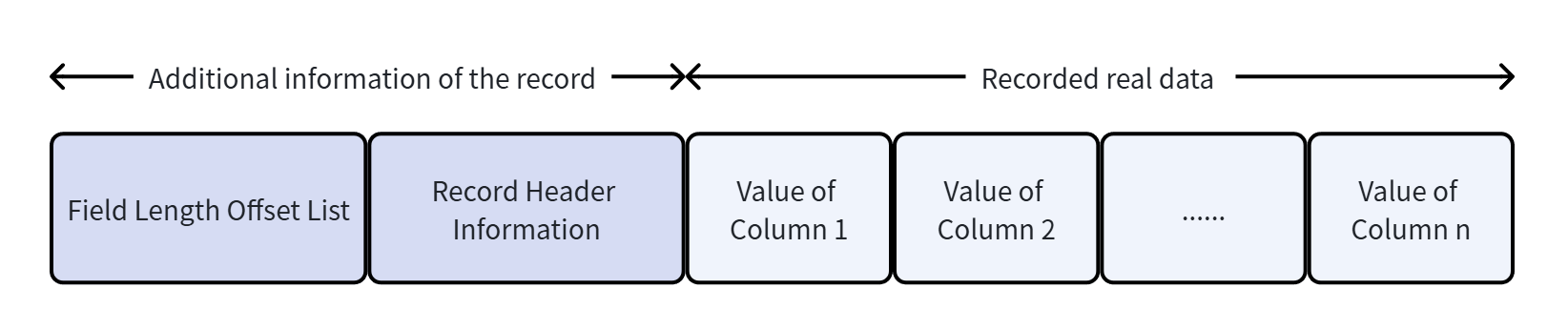
With an understanding of the COMPACT format above, we can mainly focus on comparing the differences between the two.
Field Length Offset List
REDUNDANT does not have a “variable-length” concept. Instead, it stores the lengths of all fields together (also in reverse order).
Moreover, it stores offsets rather than actual lengths. For example, if the offset list is |0C|06|, reversing it gives 06 and 0C. The first column’s length is 0x06 bytes, and the second column’s length is 0x0C - 0x06 bytes.
Record Header Information
Compared to COMPACT, the REDUNDANT record header occupies 6 bytes. The additional fields are:
| Name | Size (bits) | Description |
|---|---|---|
n_field | 10 | Number of columns in the record |
1byte_offs_flag | 1 | Flag indicating whether each offset in the field list uses 1 or 2 bytes (1 for 1 byte, 0 for 2 bytes) |
Besides the extra fields, REDUNDANT lacks the record_type attribute.
How is the 1byte_offs_flag determined? If the actual data of the entire record occupies no more than 127 bytes, offsets are stored using one byte. Otherwise, two bytes are used. (This shows that the granularity of evaluation is the entire record’s size, reflecting a slightly outdated design compared to COMPACT.)
NULL Value Handling
REDUNDANT does not have a NULL value list, but it still requires a special mechanism to handle NULL fields. It sets the highest bit of the NULL field’s offset to 1. (This is why records with actual data exceeding 127 bytes must use two bytes for offsets, as the highest bit cannot be used as a NULL flag.)
CHAR Handling
For CHAR columns using a variable-length character set, REDUNDANT directly allocates the maximum possible space. The advantage is that no further space allocation is needed later, but the downside is significant space wastage.
For extremely long fields, both COMPACT and REDUNDANT rely on a mechanism called overflow pages. Specifically, 768 bytes are used to store the actual data, and 20 bytes are used to store a pointer to the remaining data.
How long must a field be to trigger the overflow page mechanism? This actually depends on several constraints: a page must hold at least two rows, and the total size cannot exceed 16 KB. After a series of calculations, a threshold is determined. In short, you don’t need to worry too much about the exact number…
DYNAMIC
DYNAMIC is the default row format in many MySQL versions.
The key difference with DYNAMIC is that it does not use the 768-byte threshold for local storage. Instead, it stores the entire column data directly in the overflow page, leaving only a 20-byte pointer in the main record.
Under the old 768-byte approach, a table with many very long variable-length columns would consume significant memory, potentially triggering a “Row size too large” error. Additionally, storing only pointers allows more records to fit in a single page, which improves retrieval and I/O efficiency.
COMPRESSED
Compared to DYNAMIC, COMPRESSED applies compression algorithms to pages to save storage space. However, data must be decompressed into memory during read/write operations, which often impacts performance. As a result, it is rarely used in high-I/O workloads.
Although modern MySQL implements Transparent Page Compression (TPC) to mitigate some performance overhead, it relies on the filesystem’s “hole punching” mechanism, is better suited for SSDs, and uses a 4 KB alignment unit. Consequently, DYNAMIC remains more universally applicable and faster in most scenarios.